Starting your journey as a DJ can feel overwhelming with all the technical language and equipment terminology. Understanding basic DJ terms for beginners is crucial for building confidence and communicating effectively in the DJ world. This comprehensive guide covers the 10 most essential foundations that every aspiring DJ must master to succeed.
Whether you’re just starting out or looking to solidify your knowledge, these fundamental terms will help you navigate the exciting world of DJing with confidence and professionalism.
Core Equipment Terms Every Beginner DJ Should Know
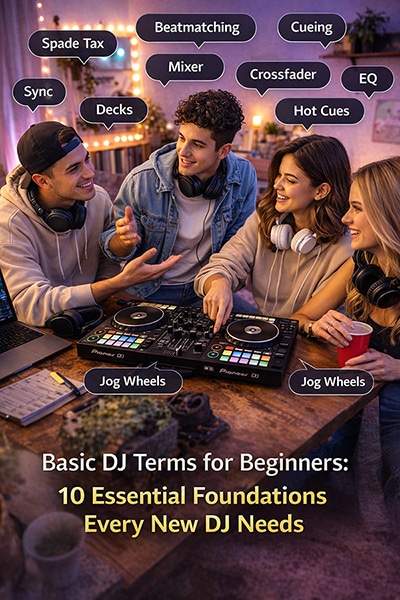
Decks refer to the individual playback units where you load and control your music. In traditional setups, these were turntables for vinyl records, but today’s digital age has expanded this term to include CD players and virtual decks in software. Most DJ setups feature two decks, allowing you to seamlessly transition between songs and create continuous mixes.
Mixers are the central hub of your DJ setup, serving as the command center where all audio signals converge. The mixer allows you to blend audio from multiple sources, adjust volume levels, apply effects, and control the overall sound output. Think of it as the brain of your DJ system that gives you creative control over your mix.
Headphones are your private listening tool that enables you to preview upcoming tracks without the audience hearing them. Professional DJ headphones typically feature closed-back designs for sound isolation and swiveling ear cups for one-ear monitoring. Quality headphones are essential for beatmatching and ensuring smooth transitions between tracks.
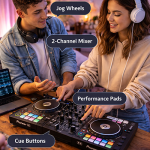
Controllers are modern DJ tools that combine the functionality of decks and mixers into a single hardware unit designed to work with DJ software. These devices feature jog wheels, faders, knobs, and buttons that control virtual decks and mixer functions on your computer. Controllers offer an affordable and portable way for beginners to start DJing without investing in separate decks and mixers.
Audio Signal Terminology for New DJs
Gain controls the input level of audio signals entering your mixer from each deck or source. Proper gain staging ensures optimal audio quality and prevents distortion or clipping. Setting appropriate gain levels is fundamental to achieving professional-sounding mixes and protecting your equipment from damage caused by excessive signal levels.
The crossfader is a horizontal slider that allows you to transition between the two main channels on your mixer. Moving the crossfader left plays only the left channel, moving it right plays only the right channel, and positioning it in the center blends both channels equally. This control is essential for creating smooth transitions and performing advanced DJ techniques like scratching.
A channel represents an individual input path on your mixer where you connect audio sources like decks, microphones, or other devices. Each channel typically includes its own set of controls including gain, EQ, and volume fader. Modern mixers usually feature between two and four channels, with each channel offering independent control over its connected source.
Master output is the final audio signal that leaves your mixer and goes to the sound system or recording device. This represents the combined mix of all active channels after processing through the mixer. The master output level is controlled by the master volume fader and determines the overall volume of your performance.
Playback Control Vocabulary Essentials
Cue functions like a bookmark system that allows you to set specific points in a track for quick access. You can set multiple cue points throughout a song to mark important sections like the intro, breakdown, or drop. The cue button also enables you to instantly jump to the beginning of a track or your set cue point, making it invaluable for precise timing during performances.
Play and pause are fundamental transport controls that start and stop audio playback. While these seem straightforward, understanding their behavior in DJ software is crucial. Some systems offer different play modes, and the pause function might maintain the playback position or reset depending on your settings.
The pitch slider (also called tempo fader) adjusts the playback speed of your track, which simultaneously changes both the tempo and pitch. This control is essential for beatmatching, allowing you to sync the tempo of two different songs for seamless mixing. Modern digital systems often include key lock features that maintain the original pitch while changing tempo.
Frequency Range Basics for Better Mixing
Bass represents the low-frequency range of audio, typically covering frequencies from 20Hz to 250Hz. Bass frequencies provide the foundation and power of most music, including kick drums and bass lines. Understanding bass control helps you create more dynamic mixes by managing the low-end energy and preventing frequency conflicts between tracks.
Mid frequencies occupy the middle range of the audio spectrum, roughly from 250Hz to 4kHz. This range contains most vocals, snare drums, and many melodic instruments. Proper mid-frequency management is crucial for maintaining clarity in your mix and ensuring that important musical elements remain audible and well-balanced.
Treble encompasses the high-frequency range above 4kHz, including cymbals, hi-hats, and the brightness of vocals and instruments. Treble control adds sparkle and presence to your mix but requires careful handling to avoid harshness or fatigue for your audience.
EQ (equalizer) allows you to adjust the balance between bass, mid, and treble frequencies. Most DJ mixers feature three-band EQs on each channel, giving you creative control over the tonal balance of individual tracks and enabling smooth harmonic mixing techniques.
Time and Rhythm Terms for Beat Synchronization
BPM (Beats Per Minute) measures the tempo or speed of a song. Understanding BPM is fundamental for beatmatching and creating smooth transitions between tracks with similar or compatible tempos. Most DJ software displays BPM automatically, but developing the ability to recognize tempo by ear is a valuable skill for any DJ.
A beat is the basic unit of time in music, typically corresponding to what you would naturally tap your foot to. In most dance music, beats are organized in groups of four, creating the foundational rhythm that drives the music forward. Recognizing beats is essential for timing your transitions and maintaining the dance floor’s energy.
A bar consists of a specific number of beats grouped together, usually four beats in dance music. Bars provide the structural framework of a song and help DJs count and predict musical phrases. Understanding bars enables more precise mixing and helps you anticipate when musical changes will occur.
A phrase is a larger musical unit typically consisting of eight or sixteen bars that represents a complete musical idea. Phrases often correspond to sections like verses, choruses, or breakdowns. Mixing at phrase boundaries creates more musical and natural-sounding transitions that respect the original song structures.
Software Interface Essentials for Digital DJing
Waveforms provide a visual representation of your audio files, displaying amplitude changes over time. These graphical displays help you identify different sections of a track, spot breaks or buildups, and align beats between songs. Modern DJ software offers detailed waveforms with color coding to represent different frequency ranges, making visual beatmatching more intuitive.
The browser is your music library management system within DJ software. It allows you to organize, search, and load tracks onto your virtual decks. Efficient browser navigation and library organization are crucial skills for maintaining smooth performances and quickly finding the right track for any moment.
Hot cues are instant-access points that you can trigger with a single button press. Unlike regular cue points, hot cues allow you to jump immediately to specific sections of a track during live performance. Most systems provide multiple hot cue slots per deck, enabling creative performance techniques and seamless loop triggering.
Connection and Cable Terminology
RCA connections are the standard analog audio connectors used in most consumer and semi-professional DJ equipment. These red and white (or red and black) connectors carry stereo audio signals and are commonly found on mixers, controllers, and audio interfaces. Understanding RCA connections is essential for setting up your equipment and troubleshooting audio issues.
XLR connectors are professional-grade balanced audio connectors that provide superior noise rejection and signal quality over longer distances. XLR connections are commonly used for microphones and professional monitor speakers. Learning about XLR connections becomes important as you advance to club-level equipment and professional venues.
An audio interface converts digital audio signals from your computer into analog signals that can be sent to mixers and speakers, and vice versa. Many DJ controllers include built-in audio interfaces, while standalone units offer more input/output options for complex setups. Understanding audio interfaces helps you choose the right equipment for your needs and budget.
Monitoring Terms for Professional Setup
Headphone cue allows you to preview audio sources through your headphones without sending them to the main speakers. This essential feature enables you to prepare your next track, check for audio issues, and beatmatch songs before introducing them to your audience. Mastering headphone cue techniques is fundamental for smooth DJ performances.
PFL (Pre-Fade Listen) is a monitoring function that sends the audio signal to your headphones before it passes through the channel fader. This allows you to hear a source at its full level regardless of the fader position, making it easier to prepare tracks and set proper gain levels before bringing them into the mix.
Booth monitors are speakers positioned near the DJ booth to provide audio reference for the performer. These speakers help DJs hear their mix accurately in the performance environment and compensate for delays or acoustic issues in the main sound system. Understanding booth monitor setup and usage becomes crucial for professional gig environments.
Setup and Configuration Language
Mapping refers to the process of assigning specific functions to the physical controls on your DJ controller or MIDI device. Custom mapping allows you to personalize your controller’s behavior and optimize it for your preferred workflow. Learning to create and modify mappings gives you greater control over your equipment and can significantly improve your performance efficiency.
Latency is the delay between when you perform an action (like pressing a button) and when you hear the result through your speakers. Low latency is crucial for responsive DJ performance and accurate beatmatching. Understanding how to minimize latency through proper audio driver selection and buffer size optimization is essential for professional-quality setups.
Buffer size determines how much audio data your computer processes at once. Smaller buffer sizes reduce latency but require more processing power, while larger buffers increase latency but provide more stable performance on less powerful systems. Finding the optimal buffer size balance is key to achieving the best performance from your DJ software.
Professional Communication Basics
Soundcheck is the process of testing all audio equipment and levels before an event begins. During soundcheck, DJs verify that all connections work properly, set appropriate volume levels, and ensure the sound system meets the venue’s requirements. Professional soundcheck procedures help prevent technical issues during performance and ensure optimal audio quality for your audience.
A rider is a document that specifies the technical and hospitality requirements for a DJ performance. Riders typically include equipment specifications, setup requirements, and any special needs for the event. Understanding how to read and create riders is important for professional DJ bookings and ensures that venues can provide appropriate support for your performance.
Tech specs refer to the detailed technical specifications of audio equipment and venue systems. These specifications include power requirements, connector types, frequency response, and compatibility information. Familiarity with tech specs helps DJs choose appropriate equipment and communicate effectively with venue technical staff.
Essential Tools and Supplies for Beginner DJs
Building a successful DJ setup requires more than just understanding terminology. Quality headphones should be your first investment, as they’re crucial for monitoring and beatmatching. Look for closed-back designs with good frequency response and comfortable fit for extended use.
DJ software forms the foundation of modern digital DJing. Popular options include Serato DJ, Pioneer’s rekordbox, and Traktor Pro. Many software packages offer free versions with basic functionality, making them perfect for beginners to explore different interfaces and find their preferred workflow.
A reliable computer with sufficient processing power and RAM ensures smooth performance during live sets. Additionally, invest in quality audio cables, USB drives for music storage and backup, and a portable hard drive for your music library expansion.
Cost and Pricing Considerations for New DJs
Starting your DJ journey doesn’t require a massive initial investment. Entry-level DJ controllers range from $100-$300 and include everything needed for basic mixing and learning fundamental skills. These controllers typically bundle with DJ software, providing complete solutions for beginners.
Professional headphones designed for DJing typically cost between $50-$200, with many excellent options available in the $100-$150 range. While more expensive models offer premium features, mid-range headphones provide excellent sound quality and durability for developing DJs.
Software licensing varies significantly between platforms. Some manufacturers offer free versions with limited features, while full professional licenses range from $99-$329. Many DJ controllers include software licenses, reducing the total cost of entry into digital DJing.
Additional equipment costs including audio interfaces, monitor speakers, and professional cables can add $200-$500 to your setup. However, these additions can wait until you’ve mastered basic techniques and decided to pursue more advanced performance opportunities.
Common Mistakes New DJs Should Avoid
Rushing into expensive equipment before developing fundamental skills is a common beginner mistake. Focus on learning basic mixing techniques and understanding basic DJ terms for beginners before investing in premium gear. Your skills matter more than your equipment in creating engaging performances.
Neglecting proper gain staging leads to distorted audio and damaged equipment. Always set appropriate input levels using the gain controls before adjusting channel and master faders. Red-lining your mixer creates harsh, unpleasant sound that will clear dance floors quickly.
Ignoring music preparation and organization results in awkward pauses and lost momentum during performances. Spend time analyzing your tracks, setting cue points, and organizing playlists before performing. Preparation enables smooth, confident performances that keep audiences engaged.
Over-relying on software automation without developing manual skills limits your creative potential and leaves you vulnerable when technology fails. Practice beatmatching by ear and learn to read waveforms and crowd responses rather than depending entirely on automated sync functions.
Expert Tips and Advice for Aspiring DJs
Practice regularly with purpose rather than just playing random tracks. Set specific goals for each practice session, whether learning new transition techniques, improving beatmatching accuracy, or exploring different musical genres. Focused practice accelerates skill development and builds muscle memory for live performances.
Study your musical genre thoroughly to understand its structure, common BPM ranges, and typical arrangement patterns. Knowledge of your chosen genre’s characteristics enables more creative mixing and helps you select tracks that work well together. Music production resources offer valuable insights into genre analysis and mixing techniques.
Record your practice sessions and listen back critically to identify areas for improvement. Recording reveals mixing mistakes that you might miss during live performance and helps track your progress over time. Many DJ software packages include built-in recording features for easy session capture.
Network within your local DJ community to learn from experienced performers and discover performance opportunities. Attend local events, join online forums, and participate in DJ workshops to build relationships and gain industry insights. Community connections often lead to mentorship opportunities and performance bookings.
Start with simple setups and gradually increase complexity as your skills develop. Master basic two-deck mixing before exploring multi-deck setups, effects processing, or advanced controller features. Building a strong foundation in fundamental techniques creates the groundwork for more sophisticated performance skills.
Conclusion: Building Your DJ Foundation
Mastering these basic DJ terms for beginners provides the essential foundation for your DJing journey. Understanding equipment terminology, audio concepts, and industry language enables clear communication with other DJs, venue staff, and equipment manufacturers. These 10 fundamental areas cover the core knowledge needed to start mixing confidently and professionally.
Remember that learning DJ terminology is just the beginning. Combine this knowledge with regular practice, quality equipment within your budget, and patience as you develop your unique style. The most successful DJs balance technical proficiency with musical creativity and crowd reading skills.
Start with basic equipment and software, avoid common beginner mistakes, and focus on building fundamental skills before advancing to complex techniques. With dedication and practice, these essential terms will become second nature, allowing you to focus on the creative aspects of DJing that make each performance unique and memorable.